<?xml version="1.0" encoding="utf-8"?><feed xmlns="http://www.w3.org/2005/Atom" ><generator uri="https://jekyllrb.com/" version="3.10.0">Jekyll</generator><link href="https://smallcity.ca/feed.xml" rel="self" type="application/atom+xml" /><link href="https://smallcity.ca/" rel="alternate" type="text/html" /><updated>2026-02-14T18:36:09+00:00</updated><id>https://smallcity.ca/feed.xml</id><title type="html">Small City | Home of Sean Lerner</title><entry><title type="html">k</title><link href="https://smallcity.ca/2019/05/20/k.html" rel="alternate" type="text/html" title="k" /><published>2019-05-20T00:00:00+00:00</published><updated>2019-05-20T00:00:00+00:00</updated><id>https://smallcity.ca/2019/05/20/k</id><content type="html" xml:base="https://smallcity.ca/2019/05/20/k.html"><![CDATA[<p>One of the most useful practices I’ve picked up over the last year is my use of a script runner to repeatedly run an arbitrary command on file changes.</p>

<p>I’ve set up a script called <code>k</code> to do this.</p>

<p><code>k</code> stands for ‘<strong><em>k</em></strong>eep it running’.</p>

<p>I’ve put it on GitHub if you’re interested in trying it out:</p>

<p><a href="https://github.com/seanlerner/k">https://github.com/seanlerner/k</a></p>

<hr />

<p>Enjoy!</p>]]></content><author><name></name></author><summary type="html"><![CDATA[One of the most useful practices I’ve picked up over the last year is my use of a script runner to repeatedly run an arbitrary command on file changes.]]></summary></entry><entry><title type="html">How To Read A Stack Overflow Question And Answer</title><link href="https://smallcity.ca/2019/05/11/how-to-read-a-stack-overflow-question-and-answer.html" rel="alternate" type="text/html" title="How To Read A Stack Overflow Question And Answer" /><published>2019-05-11T00:00:00+00:00</published><updated>2019-05-11T00:00:00+00:00</updated><id>https://smallcity.ca/2019/05/11/how-to-read-a-stack-overflow-question-and-answer</id><content type="html" xml:base="https://smallcity.ca/2019/05/11/how-to-read-a-stack-overflow-question-and-answer.html"><![CDATA[<p>I teach at a web development bootcamp and new developers often spend too much time on a single Stack Overflow question and answer.</p>

<p>They spend time trying to understand the original poster’s specific problem.</p>

<p>I advise them to skip the question and go straight to the answer.</p>

<p>The steps are:</p>

<ol>
  <li>skip the question title and body</li>
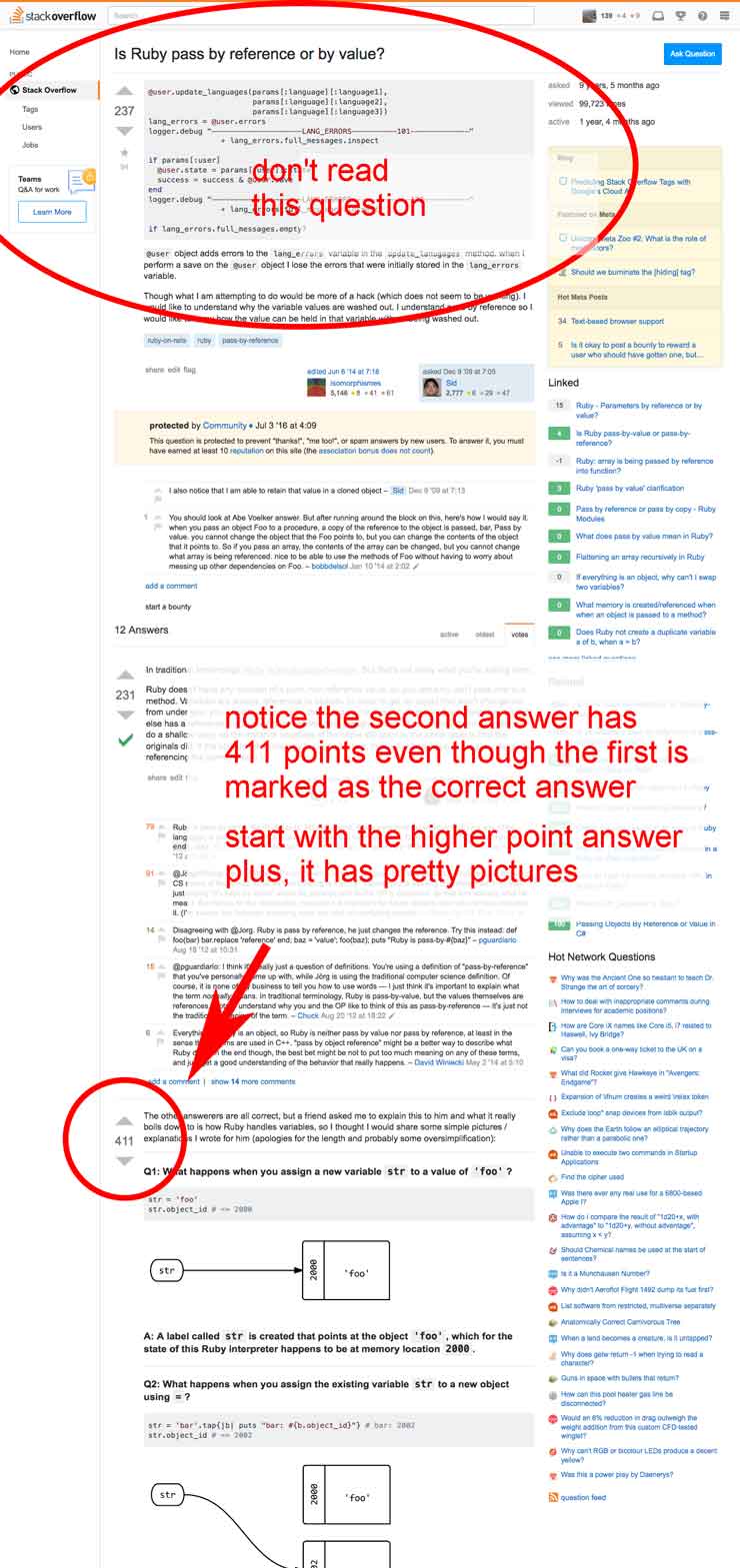
  <li>look at the number of points for the first and second  answers</li>
  <li>read the answer with the most points</li>
  <li>if needed, read the answer’s comments and read other answers in order of point value</li>
</ol>

<p>The first answer is what the original poster marked as their solution. But occasionally the second answer has more value due to either a better quality answer or the passage of time has changed what the best answer now is.</p>

<p><img src="/img/posts/stackoverflow.jpg" alt="" /></p>

<p>Most importantly, don’t read the original question: it’s likely not worth the amount effort it takes to get into the head of a distant struggling programmer’s problem.</p>

<hr />

<p>Enjoy!</p>]]></content><author><name></name></author><summary type="html"><![CDATA[I teach at a web development bootcamp and new developers often spend too much time on a single Stack Overflow question and answer.]]></summary></entry><entry><title type="html">Create An Array With A Single Hash Without The Curly Braces In Ruby</title><link href="https://smallcity.ca/2019/05/04/create-an-array-with-a-single-hash-without-the-curlys.html" rel="alternate" type="text/html" title="Create An Array With A Single Hash Without The Curly Braces In Ruby" /><published>2019-05-04T00:00:00+00:00</published><updated>2019-05-04T00:00:00+00:00</updated><id>https://smallcity.ca/2019/05/04/create-an-array-with-a-single-hash-without-the-curlys</id><content type="html" xml:base="https://smallcity.ca/2019/05/04/create-an-array-with-a-single-hash-without-the-curlys.html"><![CDATA[<p>Recently, I forgot to include curly braces for my array containing a hash.</p>

<p>Instead of this:</p>

<pre><code class="language-ruby">[{ name: 'Taylor', age: 36 }]
</code></pre>

<p>You can do this:</p>

<pre><code class="language-ruby">[name: 'Taylor', age: 36]
</code></pre>

<p>The result for both of those will be:</p>

<pre><code class="language-ruby">[{:name=&gt;"Taylor", :age=&gt;36}]
</code></pre>

<p>This falls under the “at first it seems immoral to do this, but the more I do it, the more I feel this is how the world should be” category.</p>

<p>I find this approach most useful in tests: what I’m testing takes an array of hashes, and for testing purposes I only need a single hash in the array.</p>

<hr />

<p>Enjoy!</p>]]></content><author><name></name></author><summary type="html"><![CDATA[Recently, I forgot to include curly braces for my array containing a hash.]]></summary></entry><entry><title type="html">Alias To Quickly Remove Merged Git Branches</title><link href="https://smallcity.ca/2018/07/10/alias-to-quickly-remove-merged-git-branches.html" rel="alternate" type="text/html" title="Alias To Quickly Remove Merged Git Branches" /><published>2018-07-10T00:00:00+00:00</published><updated>2018-07-10T00:00:00+00:00</updated><id>https://smallcity.ca/2018/07/10/alias-to-quickly-remove-merged-git-branches</id><content type="html" xml:base="https://smallcity.ca/2018/07/10/alias-to-quickly-remove-merged-git-branches.html"><![CDATA[<p>I’ve recently setup an alias to remove all git branches in a repo that have already been merged into master. It’s become part of my daily workflow, so I thought to share it:</p>

<pre><code class="language-bash">gdb='git branch --merged | egrep -v "(^\*|master)" | xargs git branch -d'
</code></pre>

<p>It’s <code>gdb</code> and stands for <strong><em>G</em></strong>it <strong><em>D</em></strong>elete <strong><em>B</em></strong>ranches</p>

<p>Here it is in action:</p>

<pre><code class="language-shell">❯ git branch
  feature/BACK-507-rg-sg1-m
  feature/BACK-508-rg-sg1-n
  feature/BACK-512-rg-sg1-r
  feature/BACK-513-rg-sg1-s
* master
❯ gdb
Deleted branch feature/BACK-507-rg-sg1-m (was 411d530).
Deleted branch feature/BACK-512-rg-sg1-r (was 0dc7159).
Deleted branch feature/BACK-513-rg-sg1-s (was 01ab717).
❯ git branch
  feature/BACK-508-rg-sg1-n
* master
❯
</code></pre>

<p><code>feature/BACK-508-rg-sg1-n</code> hadn’t been merged into master yet, so it remained.</p>

<p>Add the alias to your <code>.bashrc</code> (linux), <code>.bash_profile</code> (mac), or <code>.zshrc</code> (either O/S).</p>

<p>If you’re not sure how to add an alias, <a href="http://lmgtfy.com/?q=how+to+add+an+alias+to+my+terminal">let me google that for you</a>.</p>

<hr />

<p>Enjoy!</p>]]></content><author><name></name></author><summary type="html"><![CDATA[I’ve recently setup an alias to remove all git branches in a repo that have already been merged into master. It’s become part of my daily workflow, so I thought to share it:]]></summary></entry><entry><title type="html">Create An Array In Ruby Without Square Brackets</title><link href="https://smallcity.ca/2018/06/23/create-an-array-in-ruby-without-square-brackets.html" rel="alternate" type="text/html" title="Create An Array In Ruby Without Square Brackets" /><published>2018-06-23T00:00:00+00:00</published><updated>2018-06-23T00:00:00+00:00</updated><id>https://smallcity.ca/2018/06/23/create-an-array-in-ruby-without-square-brackets</id><content type="html" xml:base="https://smallcity.ca/2018/06/23/create-an-array-in-ruby-without-square-brackets.html"><![CDATA[<p>Today I learned – you can create an array without <code>[]</code>:</p>

<pre><code class="language-ruby">irb&gt; a = [1, 2, 3]
=&gt; [1, 2, 3]
irb&gt; b = 1, 2, 3
=&gt; [1, 2, 3]
irb&gt; a == b
=&gt; true
</code></pre>

<p>This seems so simple that I wonder if I learned about this a long time ago and forgot?</p>

<hr />

<p>Enjoy!</p>]]></content><author><name></name></author><summary type="html"><![CDATA[Today I learned – you can create an array without []:]]></summary></entry><entry><title type="html">Interesting Methods Gem</title><link href="https://smallcity.ca/2018/03/23/interesting-methods-gem.html" rel="alternate" type="text/html" title="Interesting Methods Gem" /><published>2018-03-23T00:00:00+00:00</published><updated>2018-03-23T00:00:00+00:00</updated><id>https://smallcity.ca/2018/03/23/interesting-methods-gem</id><content type="html" xml:base="https://smallcity.ca/2018/03/23/interesting-methods-gem.html"><![CDATA[<p>I’ve just published a simple new gem called <code>interesting_methods</code>.</p>

<p>After you install and set this up, from within <code>irb</code> and <code>pry</code>, you can type:</p>

<pre><code class="language-ruby">MyClass.im
  # &amp;
my_instance.im
</code></pre>

<p>to see all the interesting methods available to you on those objects.</p>

<hr />

<h3 id="to-set-up">To Set Up</h3>

<p>First install the gem:</p>

<pre><code class="language-shell">gem install interesting_methods
</code></pre>

<p>Then create irb and pry rc files if they don’t already exist:</p>

<pre><code class="language-shell">touch ~/.irbrc
touch ~/.pryrc
</code></pre>

<p>Edit each of those <code>rc</code> files and add the following code:</p>

<pre><code class="language-ruby">if Gem::Specification.find_all_by_name('interesting_methods').any?
  require 'interesting_methods'
end
</code></pre>

<p>You’re all set up now!</p>

<hr />

<h3 id="to-use">To Use</h3>

<p>Load up either <code>irb</code> or <code>pry</code> from your command line.</p>

<p>Add <code>.im</code> to any object to see its interesting methods.</p>

<hr />

<h3 id="example">Example</h3>

<p>Load up pry:</p>

<pre><code class="language-shell">$ pry
</code></pre>

<p>You should be at the pry prompt now:</p>

<pre><code class="language-ruby">pry &gt;
</code></pre>

<p>Paste the following code into pry:</p>

<pre><code class="language-ruby">class Animal

  @@all = []

  attr_reader :type, :sound

  def initialize(type, sound)
    @type  = type
    @sound = sound
    @@all &lt;&lt; self
  end

  def speak_loudly
    puts @sound.upcase
  end

  def speak
    puts @sound
  end

  def self.all
    @@all
  end

  def self.report
    puts "#{'Type'.rjust(15)} #{'Sound'.rjust(15)}"
    puts "#{'----'.rjust(15)} #{'-----'.rjust(15)}"
    all.each do |animal|
      puts "#{animal.type.rjust(15)} #{animal.sound.rjust(15)}"
    end
  end

end

cow = Animal.new('cow', 'moo')
</code></pre>

<p>Now check out the methods on both <code>Animal</code> and <code>cow</code> (an instance of <code>Animal</code>):</p>

<pre><code class="language-ruby">pry &gt; Animal.im
=&gt; [:all, :report]

pry &gt; cow.im
=&gt; [:sound, :speak, :speak_loudly, :type]
</code></pre>
<hr />

<h3 id="repo">Repo</h3>

<p>You can find the repo at <a href="https://github.com/seanlerner/interesting_methods">https://github.com/seanlerner/interesting_methods</a></p>

<hr />

<p>In my <a href="/2018/03/23/method-driven-development">next post</a>, you’ll find a screencast that illustrates a technique I call, <a href="/2018/03/23/method-driven-development">Method Driven Development</a> using the gem.</p>

<p>Enjoy!</p>]]></content><author><name></name></author><summary type="html"><![CDATA[I’ve just published a simple new gem called interesting_methods.]]></summary></entry><entry><title type="html">Method Driven Development</title><link href="https://smallcity.ca/2018/03/23/method-driven-development.html" rel="alternate" type="text/html" title="Method Driven Development" /><published>2018-03-23T00:00:00+00:00</published><updated>2018-03-23T00:00:00+00:00</updated><id>https://smallcity.ca/2018/03/23/method-driven-development</id><content type="html" xml:base="https://smallcity.ca/2018/03/23/method-driven-development.html"><![CDATA[<p>I’ve created a screencast to show you a technique I sometimes use. I call this approach “<strong><em>Method Driven Development</em></strong>” (MDD).</p>

<p>(I’m sure many people use this technique, though I don’t know if there’s a name for it.)</p>

<p>Using MDD, I explore the <a href="https://github.com/alexreisner/geocoder">Geocoder gem</a> with the goal of finding the distance between Toronto and Chicago.</p>

<p>After watching this video, you’ll understand the ins and outs of <em>MDD</em>, including how to:</p>

<ul>
  <li>investigate the methods that are available on each Ruby object</li>
  <li>sift through those methods and quickly find the method you want</li>
  <li>pull up docs on the method without leaving <code>pry</code></li>
  <li>use Ruby’s <code>grep</code> method</li>
</ul>

<p>Plus, you’ll also learn the basics of the geocoder gem: searching, distance between, working with kilometeres and miles.</p>

<p>Ready to give it a try? Install the <a href="/2018/03/23/interesting-methods-gem">interesting_methods gem</a> I’ve just released and then code along as you watch this video.</p>

<hr />

<iframe width="736" height="414" src="https://www.youtube.com/embed/BwY7mlFgPgo" frameborder="0" allow="autoplay; encrypted-media" allowfullscreen=""></iframe>

<hr />

<p><em>Update:</em></p>

<p>There’s a few thoughtful <code>pry</code> tips on a reddit thread for this screencast:</p>

<p><a href="https://www.reddit.com/r/ruby/comments/86vncl/method_driven_development_with_the_new/">https://www.reddit.com/r/ruby/comments/86vncl/method_driven_development_with_the_new/</a></p>

<p>Most useful is that <code>pry</code> has an <code>ls</code> command to show just the useful stuff about an object.</p>

<p>Let’s say you have an <code>Animal</code> class that <code>speaks</code>:</p>

<pre><code class="language-ruby">class Animal
  def speak
    puts 'Moo'
  end
end
</code></pre>

<p>Meanwhile in <strong><em>pry</em></strong>:</p>

<pre><code class="language-irb">pry&gt; ls Animal
Object.methods: yaml_tag
Animal#methods: speak
</code></pre>

<p>Here’s what <code>Rails</code> looks like:</p>

<pre><code class="language-irb">pry&gt; ls Rails
constants:
  Application  Configuration  ConsoleMethods  Engine      Html  InfoController  LineFiltering      Paths  Railtie  TestUnit         VERSION
  Command      Console        Dom             Generators  Info  Initializable   MailersController  Rack   Secrets  TestUnitRailtie  WelcomeController
#&lt;Module:0x00007faa75953720&gt;#methods: reachable?
ActiveSupport::Autoload#methods: autoload  autoload_at  autoload_under  autoloads  eager_autoload  eager_load!
Rails.methods:
  app_class   application   backtrace_cleaner  cache=         env   gem_version  initialize!   logger   public_path  version
  app_class=  application=  cache              configuration  env=  groups       initialized?  logger=  root
instance variables: @_at_path  @_autoloads  @_eager_autoload  @_env  @_under_path  @app_class  @application  @cache  @logger
</code></pre>

<hr />

<p>Enjoy!</p>]]></content><author><name></name></author><summary type="html"><![CDATA[I’ve created a screencast to show you a technique I sometimes use. I call this approach “Method Driven Development” (MDD).]]></summary></entry><entry><title type="html">Bare Bones Rails Action Cable Tutorial</title><link href="https://smallcity.ca/2018/03/01/bare-bones-rails-action-cable-tutorial.html" rel="alternate" type="text/html" title="Bare Bones Rails Action Cable Tutorial" /><published>2018-03-01T00:00:00+00:00</published><updated>2018-03-01T00:00:00+00:00</updated><id>https://smallcity.ca/2018/03/01/bare-bones-rails-action-cable-tutorial</id><content type="html" xml:base="https://smallcity.ca/2018/03/01/bare-bones-rails-action-cable-tutorial.html"><![CDATA[<p>This tutorial uses a minimal amount of code to make an Action Cable chat server.</p>

<hr />

<h3 id="about-this-app">About this app</h3>

<p>Users simply visit the homepage, enter their name, and then enter the chat room.</p>

<p>The messages from users will appear as a streaming message feed.</p>

<p>Let’s get started!</p>

<hr />

<h3 id="create-a-new-rails-app">Create a new rails app</h3>

<pre><code class="language-shell">$ rails new simple-chat
$ cd simple-chat
</code></pre>

<hr />

<h3 id="remove-coffee-script">Remove coffee script</h3>

<p>Find the coffee-rails gem in your Gemfile:</p>

<p><code>/Gemfile</code></p>

<pre><code class="language-ruby">...

# Use CoffeeScript for .coffee assets and views
gem 'coffee-rails', '~&gt; 4.2'

...
</code></pre>

<p>And then comment it out:</p>

<pre><code class="language-ruby">...

# Use CoffeeScript for .coffee assets and views
# gem 'coffee-rails', '~&gt; 4.2'

...
</code></pre>

<p>Run <code>bundle</code>:</p>

<pre><code class="language-shell">$ bundle
</code></pre>

<hr />

<h3 id="generate-a-home-controller-and-index-page">Generate a home controller and index page</h3>

<pre><code class="language-shell">$ rails generate controller home index --no-assets --no-test-framework --no-helper
</code></pre>

<hr />

<h3 id="generate-a-chat-channel">Generate a chat channel</h3>

<pre><code class="language-shell">$ rails generate channel chat
</code></pre>

<hr />

<h3 id="start-server">Start server</h3>

<pre><code class="language-shell">$ rails server
</code></pre>

<hr />

<h3 id="configure-routes">Configure routes</h3>

<p>Replace your routes file with the following:</p>

<p><code>/config/routes.rb</code></p>

<pre><code class="language-ruby">Rails.application.routes.draw do
  root 'home#index'
end
</code></pre>

<hr />

<h3 id="configure-the-server-side-of-the-channel">Configure the server side of the channel</h3>

<p>Replace the Ruby chat channel file with the following:</p>

<p><code>/app/channels/chat_channel.rb</code></p>

<pre><code class="language-ruby">class ChatChannel &lt; ApplicationCable::Channel

  def subscribed
    stream_from 'chat'
  end

  def receive(data)
    ActionCable.server.broadcast('chat', data)
  end

end
</code></pre>

<hr />

<h3 id="configure-the-client-side-of-the-channel">Configure the client side of the channel</h3>

<p>Replace the JavaScript chat channel file with the following:</p>

<p><code>/app/assets/javascripts/channels/chats.js</code></p>

<pre><code class="language-js">App.chat =
  App.cable.subscriptions.create('ChatChannel', {
    received: prepend_msg
  })

addEventListener('turbolinks:load', function () {
  join_chat_form.addEventListener('submit', join_chat)
  message_form.addEventListener('submit', send_msg)
})

function join_chat(event) {
  event.preventDefault()

  if (!username.value)
    return

  enter_name_container.style.display = 'none'
  messages_container.style.display   = 'block'

  const msg = `${username.value} joined the chat`
  App.chat.send({ msg })

  message.focus()
}

function send_msg(event) {
  event.preventDefault()

  const msg = `${username.value}: ${message.value}`
  App.chat.send({ msg })

  message.value = ''
}

function prepend_msg(data) {
  const p = document.createElement('p')
  add_time_stamp(p)
  p.append(data.msg)
  messages.prepend(p)
}

function add_time_stamp(p) {
  const
    time = new Date().toLocaleTimeString(),
    pre  = document.createElement('pre')

  pre.append(time)
  p.append(pre)
}
</code></pre>

<hr />

<h3 id="add-view">Add view</h3>

<p>Replace the <em>index erb template</em> with the following:</p>

<p><code>/app/views/home/index.html.erb</code></p>

<pre><code class="language-erb">&lt;div id=enter_name_container&gt;

  &lt;p&gt;Enter your name:&lt;p&gt;

  &lt;%= form_tag '', id: 'join_chat_form' do %&gt;
    &lt;%= text_field_tag :username %&gt;
    &lt;br&gt;&lt;br&gt;
    &lt;%= submit_tag 'Enter chat', data: { disable_with: false } %&gt;
  &lt;% end %&gt;

&lt;/div&gt;

&lt;div id=messages_container style='display: none'&gt;

  &lt;%= form_tag '', id: 'message_form' do %&gt;
    &lt;%= text_field_tag :message %&gt;
  &lt;% end %&gt;

  &lt;div id=messages&gt;
  &lt;/div&gt;

&lt;/div&gt;
</code></pre>

<hr />

<h3 id="add-styles">Add styles</h3>

<p>Replace the existing stylesheet with the following:</p>

<p><code>/app/assets/stylesheets/application.css</code></p>

<pre><code class="language-css">/*
*= require_tree .
*= require_self
*/

body {
  background: beige;
  font-family: sans-serif;
  margin: 0 auto;
  padding: 2rem;
  width: 400px;
}

pre {
  margin: 0;
}

input {
  padding: .5rem;
}

#message {
  width: 250px;
}
</code></pre>

<hr />

<h3 id="try-it-out">Try it out</h3>

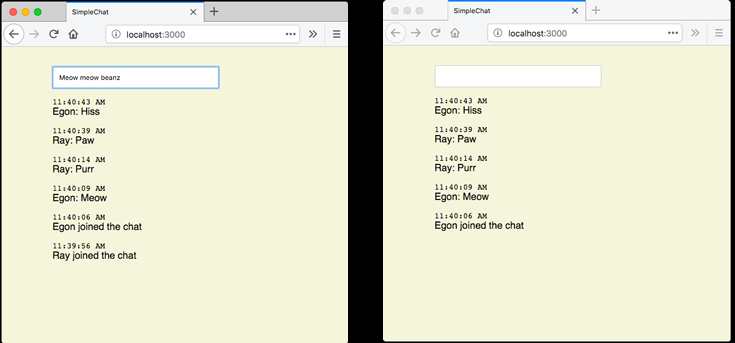
<p>Open two separate browser windows to <a href="http://localhost:3000">http://localhost:3000</a> and have a nice conversation with yourself.</p>

<p>Your browsers should look something like this. In my example, I demo my two cats “Ray” and “Egon” chatting:</p>

<p><img src="/img/posts/egon-ray-chat.jpg" alt="" /></p>

<hr />

<p>For next steps, <a href="https://google.ca/search?q=rails+action+cable+tutorial">google “rails action cable tutorial”</a> for more guides and examples that delve deeper into Action Cable.</p>

<hr />

<p>Enjoy!</p>]]></content><author><name></name></author><summary type="html"><![CDATA[This tutorial uses a minimal amount of code to make an Action Cable chat server.]]></summary></entry><entry><title type="html">Simple, Handy “Edit Output” Script</title><link href="https://smallcity.ca/2018/02/25/simple-handy-edit-output-script.html" rel="alternate" type="text/html" title="Simple, Handy “Edit Output” Script" /><published>2018-02-25T00:00:00+00:00</published><updated>2018-02-25T00:00:00+00:00</updated><id>https://smallcity.ca/2018/02/25/simple-handy-edit-output-script</id><content type="html" xml:base="https://smallcity.ca/2018/02/25/simple-handy-edit-output-script.html"><![CDATA[<p>Sometimes scripts I write to automate my work-flow I’ll use again and again, while others turnout not to be so useful longterm. Recently I wrote a script that I find I’m using repeatedly, so I thought I’d share it.</p>

<p>It’s called <code>edit_output</code> or <code>eo</code> for short.</p>

<p>It takes the output of your last command issued on the command line and opens it up in your editor. I find it’s useful when I’d like to copy a part of the output to my clipboard.</p>

<p>“<code>eo</code>” helps keep my hands on the keyboard and away from the mouse.</p>

<hr />

<h3 id="how-to-setup-and-use">How to setup and use</h3>

<p>You’ll need <a href="https://iterm2.com">iTerm2</a> (on a Mac) for this to work.</p>

<p>Save the following to the file <code>eo</code> and put it in a <code>bin</code> folder that’s in your <code>PATH</code>.</p>

<pre><code class="language-applescript">#!/usr/bin/env osascript

tell application "iTerm2"
  tell current session of current window
    tell application "System Events" to keystroke "a" using {command down, shift down}
    tell application "System Events"
      key code 53
    end tell
  end tell
end tell

tell application "Sublime Text"
   activate
end tell

tell application "System Events" to keystroke "n" using {command down}
tell application "System Events" to keystroke "v" using {command down}

return " Last output copied to your editor"
</code></pre>

<p>My editor is Sublime Text. If you use a different editor, you’ll need to change the editor specified in the script accordingly.</p>

<p>For me, the <code>path</code> of the script is:</p>

<pre><code class="language-shell">~/bin/eo
</code></pre>

<p>After you save <code>eo</code>, make it an executable script:</p>

<pre><code class="language-shell">$ chmod +x ~/bin/eo
</code></pre>

<hr />

<h3 id="test-it-out">Test it out</h3>

<p>From the command line, type a command that produces output, like the following:</p>

<pre><code class="language-shell">$ ls -al
</code></pre>

<p>Then type:</p>

<pre><code class="language-shell">eo
</code></pre>

<p>The output of your command should be in your editor.</p>

<hr />

<p>Enjoy!</p>]]></content><author><name></name></author><summary type="html"><![CDATA[Sometimes scripts I write to automate my work-flow I’ll use again and again, while others turnout not to be so useful longterm. Recently I wrote a script that I find I’m using repeatedly, so I thought I’d share it.]]></summary></entry><entry><title type="html">Announcing Clip Trigger</title><link href="https://smallcity.ca/2018/02/19/announcing-clip-trigger.html" rel="alternate" type="text/html" title="Announcing Clip Trigger" /><published>2018-02-19T00:00:00+00:00</published><updated>2018-02-19T00:00:00+00:00</updated><id>https://smallcity.ca/2018/02/19/announcing-clip-trigger</id><content type="html" xml:base="https://smallcity.ca/2018/02/19/announcing-clip-trigger.html"><![CDATA[<p>For the past while I’ve been working on an application that triggers actions based on your clipboard content.</p>

<hr />

<p>For example, let’s say you’re developing a website and need some <a href="https://baconipsum.com/">Bacon Ipsum</a>. From your text editor you would:</p>

<ol>
  <li>Copy the shortcode to your clipboard. In this case it’s <code>bc</code>.</li>
  <li>Wait a second while Bacon Ipsum is retrieved from the Bacon Ipsum API.</li>
  <li>Paste your clipboard contents.</li>
  <li>See Bacon Ipsum!</li>
</ol>

<hr />

<p>If you’d like to give it a try (currently it’s only for Mac and is “alpha”), <a href="https://github.com/seanlerner/clip-trigger-distribution/blob/master/README.md">download it from here</a>.</p>

<p>The main repo is at:<br />
<a href="https://github.com/seanlerner/clip-trigger">https://github.com/seanlerner/clip-trigger</a></p>

<p>Enjoy!</p>]]></content><author><name></name></author><summary type="html"><![CDATA[For the past while I’ve been working on an application that triggers actions based on your clipboard content.]]></summary></entry></feed>